
We have had several recent tech support requests from members wondering why certain values were included (or not included) in some of the NPAmarketplace fields that feature dropdown lists.
Upon further investigation, the fields in question do NOT actually use dropdown values; they are instead open-ended fields where the user can enter freeform text. What seems to be happening is that the user's browser is suggesting autofill responses based on previous forms/fields in the user's browser history.
Autofill can be a useful tool, but it can also be a real headache if you don't catch it in time. For example, when members register for one of our events, they may inadvertently supply a personal email address instead of their work email if that's what the Autofill feature suggests. For members who are frustrated by this feature, it can be disabled at the browser level. Here are some good instructions for various browsers: How To: Turn Off Autofill in a Browser (centralreach.com).
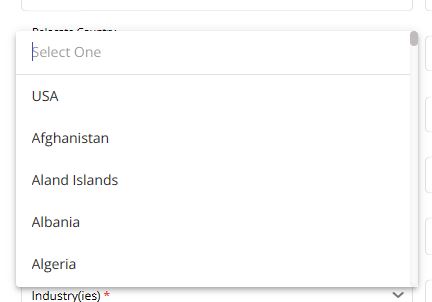
For NPAmarketplace users, the dropdown values will display like this:
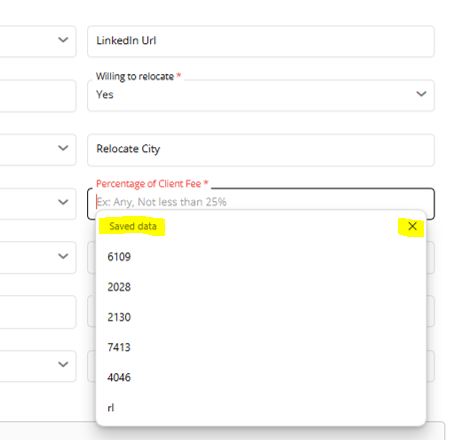
Whereas autofill suggestions appear similar to this, usually with an option to close the window:
If you're seeing a dropdown that doesn't make sense, or is missing obvious values, double-check to make sure you're not looking at a list of autofill suggestions.