If you've posted a job, and you notice after a while that you aren't getting as many job board applications, or reach-outs from your NPA partners, it could be that your job has gone "stale." That means, it might be a couple weeks old, and is no longer appearing on the first page of search results in Marketplace or on the job board (and the other boards we cross-post to).
To refresh your job, we suggest cloning it, rather than just editing it. That is because cloning it will create a whole new job number, and the new post will be moved to the top of the job search results and go out in alerts.
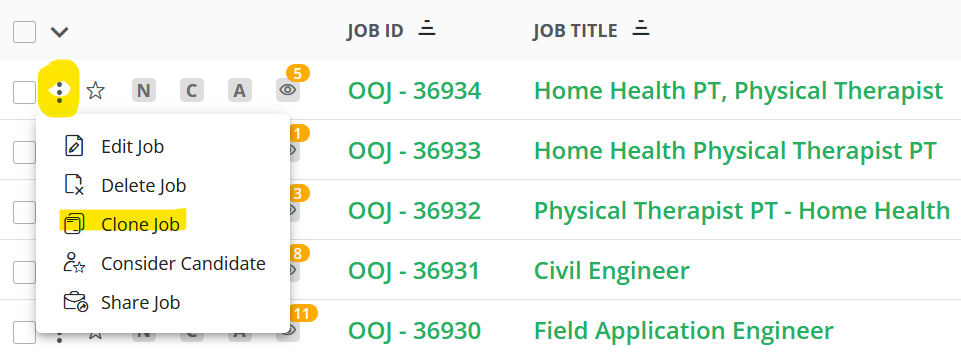
To clone your job, click the 3 dots to the left of the job, and select 'Clone Job':
This will copy your job posting into a new post.
NOTE: If you post to the job board, we suggest changing the post a bit - change the title and description, or even change the location to a nearby/neighboring city. The reason is, duplicate jobs don't get posted, and job boards may not see the job as "new" unless you change it up. Something easy you can do is take the job description and use a free AI tool to re-write it.
Now, click 'Post Job' at the bottom, and your "new" post is good to go!
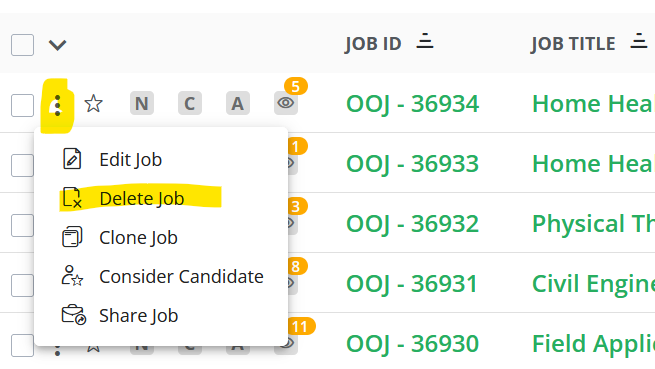
Remember to delete your old posting by clicking the 3 dots to the left of it, and selecting 'Delete Job':