
Dear Nicky,
I've been trying to set up Search Alerts for candidates and I'm struggling to see the candidates I want. There must be a way to make this easier. Help!
Struggling in Standish
Dear Stan,
I'm sorry you've been having such a hard time. I do have an idea that I think will help. We recently rolled out new Occupational Categories on NPAmarketplace - this is something that is needed to help with the job feeds that our aggregators receive so that the right jobs get picked up and advertised in the right places. We also thought it would be beneficial to members as well, so you will see this on both the Add Job and Add Candidate screens. It is a required field, with a single-select option, and is based on the OCCUPATION (not the industry). So for an example, an accountant role in a hospital should be in the occupational category Accounting/Financial Services/Investing, as the occupation is accountant. These fields are also searchable, which means you can use them to create broad search alerts based on occupation. We always recommend starting with broad search criteria to make sure you aren't overlooking desired candidates or jobs; there are not hundreds of new records getting posted each day.
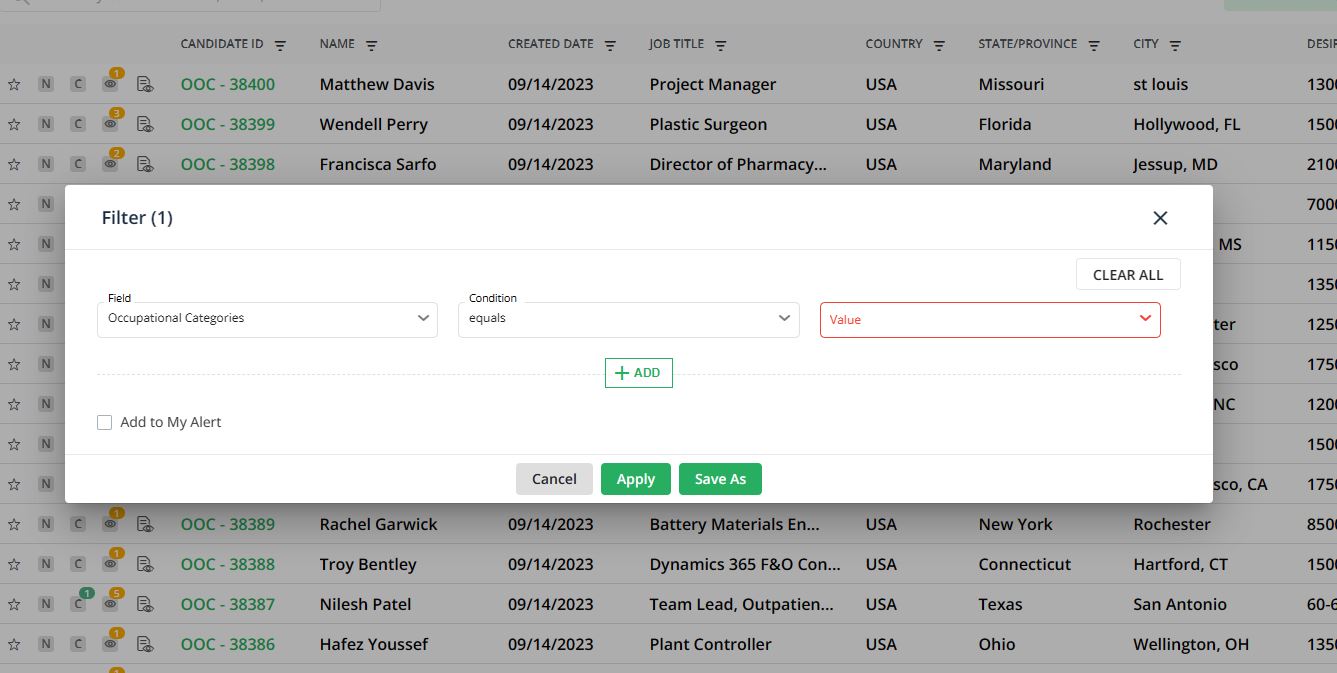
To create a search alert using occupational category as the criteria, use the Filter option as follows:
- Select Field = Occupational Categories
- Condition = equals
- Value = select as many options as you need from the list
- Click the Add to My Alert button
- Click Save As and complete the fields to save your alert
As always, please contact techsupport@npaworldwide.com if you have any questions about creating or editing alerts.
Nicky
send letters to: nanderson@npaworldwide.com