
Did you know that there are two ways to get your candidates into the NPAMarketplace database? One is to add them yourself by uploading the resume and filling out the 'Add Candidate' form. The other is to invite the candidate to register themselves.
Each member has a unique recruiter code that you can use to ‘invite’ candidates to the network. When your candidates click the link and register, they will be marked as belonging to you and your firm. You can find your unique referral link by going to your profile settings, and the ‘invite candidates’ tab (the actual link will have a long referral code attached)… you can just copy and paste it and send to candidates via your email / LinkedIn message / etc.:

Once they register themselves, you will have to go in and fill out the ‘recruiter comments’ section, and then they will appear in the Marketplace database for other members to find.
If your candidate says they followed your link and registered, but you don't see them under your My Active Candidates folder, check your NPAMarketplace dashboard. A red dot on the Bell icon indicates you have Notifications and/or Approvals needing your attention:
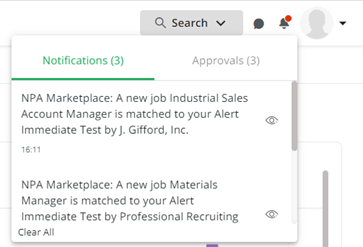
Click on the word Approvals. A message window tells me I have 3 Pending Approvals:
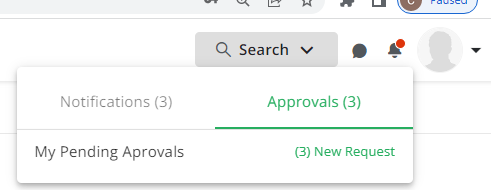
Click on the (3) New Request link and a list window opens showing the 3 invited candidates:
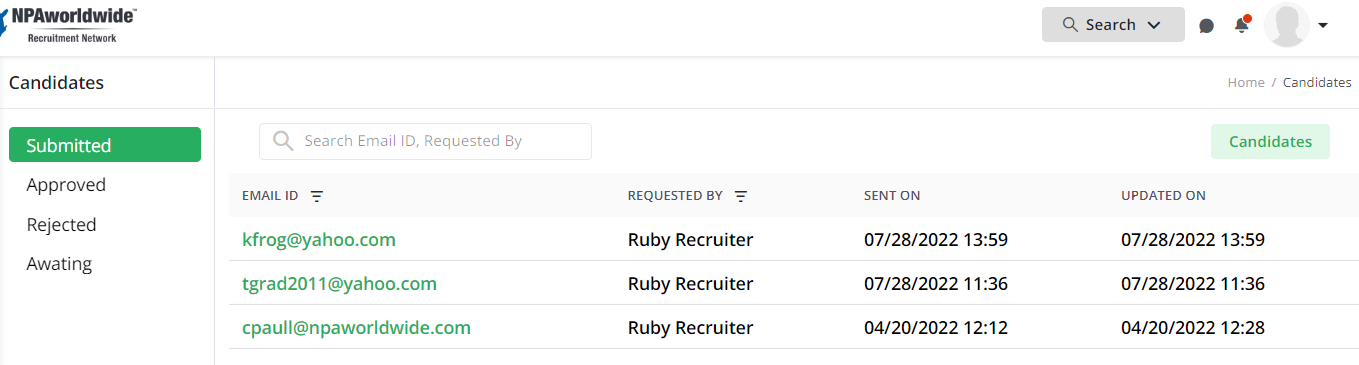
Now, click on the candidate’s email address to open their profile and add your recruiter comments, review the data the candidate provided then click the Post Candidate button.
Now, your candidate(s) are live in the NPAMarketplace database, and can be found by your NPA partners who would reach out to you if they think your candidate may be a fit for their job. Please note, this does not give your candidate access to the NPA Job Board - that is a separate site, and includes jobs that members may not be open to doing splits on.